
For a long time, the tools available to grassroots coaches and the tools used by professional clubs existed in completely different worlds. Elite clubs had dedicated analysts, performance software, squad management systems and tactical platforms. Grassroots coaches had WhatsApp groups, spreadsheets, paper session plans and notepads.
That gap has closed. The same capabilities that professional coaching staff rely on to manage their squads, plan their sessions and analyse their performance are now accessible to every coach, regardless of level, budget or technical background. More coaches at grassroots and amateur level are making the switch to a dedicated football coaching app, and the reasons are consistent across all of them.
The average grassroots coach manages their team across a surprising number of different tools. Session plans live in one place. Player contact details in another. Attendance tracked on a spreadsheet. Injury notes in a WhatsApp message from three weeks ago. Formation ideas sketched on paper. Game results recorded wherever there was space to write them down.
Each of those tools works in isolation. None of them talk to each other. And the result is a coaching workflow that requires constant context-switching, where finding any piece of information about a player or a past session means searching across multiple platforms and hoping you saved it in the right place.
A dedicated football coaching app centralises all of it. Player profiles, session plans, game records, attendance history, injury tracking and season scheduling all sit in the same platform, accessible from the same device at any time. The time saved is significant. More importantly, the quality of decisions improves when all the relevant information is available in one view rather than scattered across half a dozen tools.
CoachTactiQ is built around five connected hubs: Team, Training, Game, Insight and Season. Each hub manages a distinct area of the coaching workflow and all of them feed into the same player and team data, so information captured in one hub is immediately visible across all the others.
Designing a training session used to mean searching YouTube for drill ideas, sketching formations on paper or assembling slides in PowerPoint that players would look at for thirty seconds before the session started. None of those approaches produce plans that are easy to deliver, easy to adapt or easy to reuse.
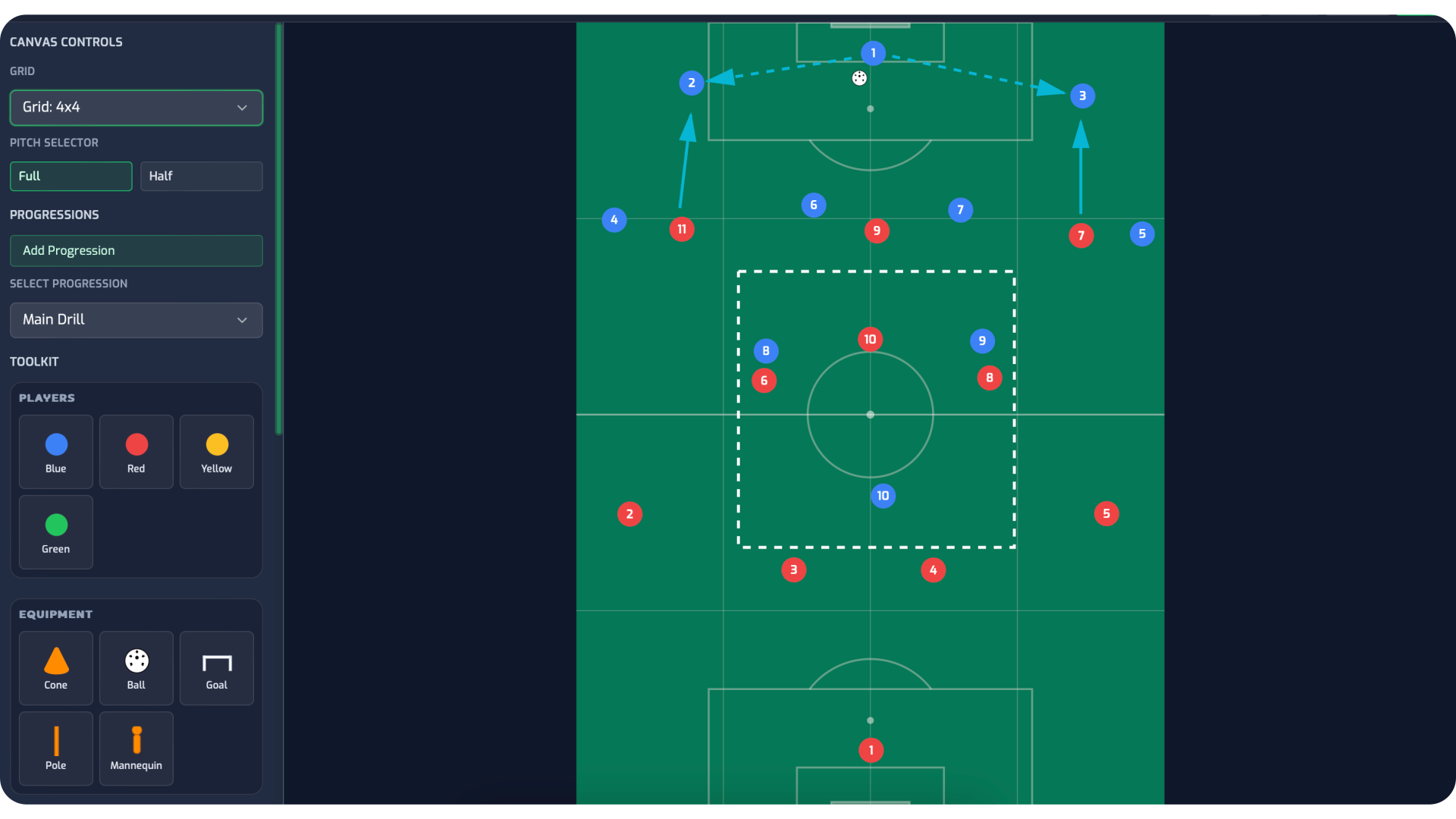
A football coaching app changes what is possible in session design. CoachTactiQ's Training Hub includes a drag and drop drill designer that lets coaches build activities visually, place players and equipment on a pitch graphic, add movement arrows and then animate the drill so the full movement pattern plays out before anyone sets foot on the pitch. Progressions and coaching notes are built directly into each drill, so the harder and simpler versions of every activity are ready to go and the key coaching points are captured before the session begins.
Sessions are assembled across three phases: warm-up, main session and cool-down, matching the structure coaches already use and making it straightforward to sequence drills, add breaks, insert quick activities and write notes at any point in the plan. Completed sessions can be saved as templates and built into a library that grows more valuable with every session added.
Managing game day without a dedicated tool means confirmation messages sent across multiple chats, lineups decided and then changed and forgotten, match events noted on a phone or not at all, and player ratings that exist only in the coach's head until they fade.
CoachTactiQ's Game Hub handles the full game day workflow in a single place. Before the game, coaches can confirm match details, send attendance reminders to the whole squad and see in real time who is available, injured or away. The lineup is selected using the drag and drop formation builder, with opponent notes added directly to the game record so preparation is documented rather than verbal.
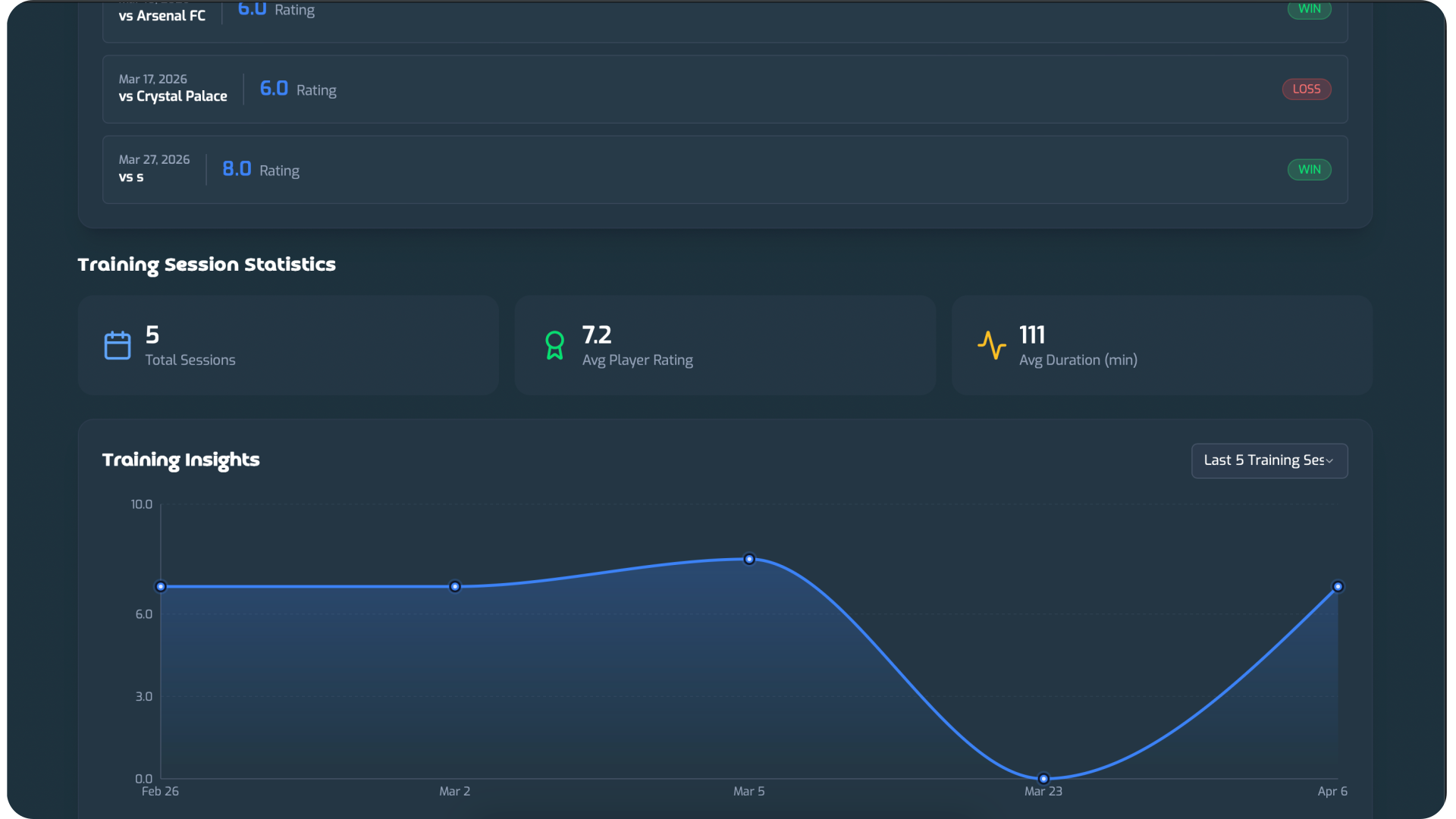
During the game, goals, assists, cards, substitutions and timestamped notes can be tracked live. After the game, each player receives a performance rating, a man of the match is selected and the result is logged. All of that data feeds directly into the Insight Hub, contributing to the player and team performance picture that builds over the course of the season.
The cumulative value of capturing this data consistently is significant. Coaches who track game events and player ratings across a full season have a detailed, evidence-based record of how every player has performed that no memory or paper note can match.
Three of the most time-consuming administrative tasks in grassroots football are tracking who turns up, managing player injuries and communicating individual player progress. Done manually, each one requires consistent effort to maintain. Done poorly, they create blind spots that affect selection decisions, training design and player relationships.
CoachTactiQ's Team Hub centralises all three. Attendance is managed automatically: coaches send reminders before sessions and games, players respond and the record is updated without manual data entry. Over a season, that attendance data becomes a useful signal for understanding squad availability patterns and for having informed conversations with players who are missing sessions regularly.
Injury management goes beyond a note in a message thread. Each player has a medical history record within their profile, with dynamic return dates, injury classification and ongoing notes that keep the full injury picture in one place. Coaches who manage squads with multiple players carrying injuries at different stages of recovery will recognise immediately how much easier that becomes when the information is structured and accessible rather than scattered.
Player report cards give coaches a formal way to communicate individual performance and development feedback. Rather than a verbal conversation at the end of training that is quickly forgotten, a documented player report card creates a record that both the coach and the player can refer back to over time.
Managing a football season without a central planning tool means fixtures added to personal calendars, training sessions booked informally, meetings arranged over message threads and a season structure that exists in the coach's head rather than anywhere accessible to the whole squad.
CoachTactiQ's Season Hub gives coaches a complete view of their season in one place. Games and competitions are created and linked directly to the Game Hub, so everything from pre-match preparation to post-match review flows through the same record. Training sessions can be set as recurring events, so a Tuesday and Thursday training schedule for the whole season is created once and generates automatic attendance reminders for every session. Team meetings and events are scheduled in the same calendar, giving both coaches and players a single source of truth for the season's schedule.
The ability to keep season data separate by season is also practically valuable. Each season's games, training sessions, player ratings and performance data stays within its own record, making it straightforward to compare how a squad is developing from one season to the next.